
Introduction
Building a website is easy—but building a high-performance website infrastructure from day one is what truly makes a difference. Many developers and business owners focus heavily on design and features while overlooking the backend setup. This often leads to slow loading speeds, poor scalability, and frequent downtime.
If you want your website to perform well under pressure and scale smoothly as traffic grows, you need to start with the right foundation. In this guide, we will walk through the essential steps to build a fast, reliable, and scalable infrastructure from the beginning.
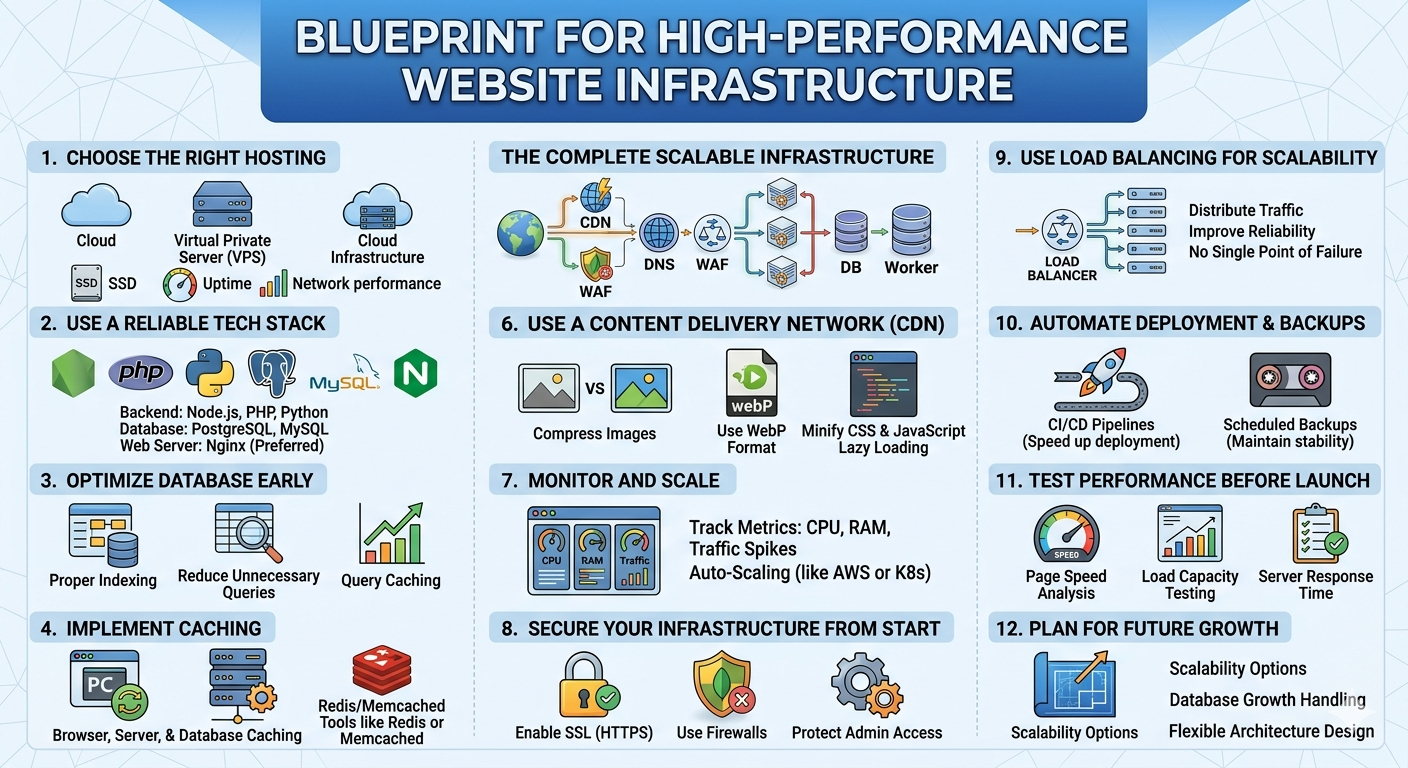
1. Choose the Right Hosting Environment
Your hosting environment is the backbone of your website’s performance. Choosing the wrong type of hosting can limit your website’s potential before it even grows.
Instead of relying on shared hosting, consider:
- Virtual Private Server (VPS)
- Dedicated Server
- Cloud Infrastructure
A VPS offers a good balance between cost and performance, giving you dedicated resources and better control. For larger projects, cloud infrastructure provides scalability and flexibility.
Always look for providers that offer SSD storage, reliable uptime, and strong network performance.
2. Use a Reliable Tech Stack
The technologies you choose directly impact performance. A modern and optimized tech stack ensures your website runs efficiently.
Common high-performance stack:
- Backend: Node.js, PHP, or Python
- Database: PostgreSQL or MySQL
- Web Server: Nginx or Apache
Among these, Nginx is often preferred for high-traffic environments due to its ability to handle concurrent connections efficiently.
3. Optimize Your Database Early
Database performance plays a critical role in overall speed. Poor database design can quickly become a bottleneck.
Best practices include:
- Adding proper indexing
- Structuring data efficiently
- Reducing unnecessary queries
- Using query caching where possible
Optimizing early prevents major performance issues later when your data grows.
4. Implement Caching
Caching is one of the most effective ways to improve website performance. It reduces the need for repeated processing and database queries.
Types of caching:
- Browser caching
- Server-side caching
- Database caching
Tools such as Redis or Memcached can significantly reduce response times and server load, especially for high-traffic websites.
5. Use a Content Delivery Network (CDN)
A CDN distributes your website content across multiple global servers, allowing users to access data from the nearest location.
Benefits include:
- Faster loading times
- Reduced latency
- Lower server load
This is especially important if your audience is spread across different regions.
6. Optimize Media and Assets
Heavy images and unoptimized files can slow down your website significantly.
To improve performance:
- Compress images before uploading
- Use modern formats like WebP
- Minify CSS and JavaScript
- Enable lazy loading for images
These optimizations can greatly improve loading speed with minimal effort.
7. Monitor and Scale
Performance optimization is not a one-time task. Continuous monitoring is essential to maintain a high-performance system.
Track key metrics such as:
- CPU usage
- Memory usage
- Traffic spikes
- Server response time
As your traffic increases, scale your infrastructure accordingly to avoid performance drops.
8. Secure Your Infrastructure from the Start
Security is closely tied to performance. A compromised server can lead to downtime and slow performance.
Basic security practices:
- Enable SSL (HTTPS)
- Use firewalls
- Keep software updated
- Protect admin access
A secure system ensures stability and protects your resources from unnecessary load.
9. Use Load Balancing for Scalability
When traffic grows, a single server may not be enough. Load balancing distributes traffic across multiple servers.
Advantages:
- Improved reliability
- Better performance under load
- Reduced risk of downtime
This is essential for websites expecting high or unpredictable traffic.
10. Automate Deployment and Backups
Manual processes can slow down development and introduce errors.
Automation helps:
- Speed up deployment
- Ensure consistent configurations
- Maintain regular backups
Using CI/CD pipelines and scheduled backups ensures your system remains stable and recoverable.
11. Test Performance Before Launch
Never launch a website without proper testing.
Use performance testing tools to analyze:
- Page speed
- Load capacity
- Server response time
Identifying issues early allows you to fix them before users experience problems.
12. Plan for Future Growth
A high-performance website should not only work well today but also be ready for tomorrow.
Consider:
- Scalability options (cloud migration)
- Database growth handling
- Flexible architecture design
Planning ahead saves time and prevents costly migrations later.
Conclusion
Building a high-performance website infrastructure from day one is a smart investment. It ensures your website is fast, reliable, and ready to scale as your audience grows.
By choosing the right hosting, optimizing your database, implementing caching, and continuously monitoring performance, you can create a strong foundation that supports long-term success.
Start with the right infrastructure, and you will avoid major problems in the future while delivering a better experience to your users.
