
7 Steps: How Websites Are Delivered
Introduction
Ever wondered what actually happens when you type a website URL into your browser and press enter? Within just a few seconds, a fully designed website appears on your screen. It may seem instant, but behind the scenes, multiple systems are working together to make it happen.
Understanding how websites are delivered is important, especially if you own a website, manage hosting, or are learning about web technology. From DNS lookups to server responses, every step plays a role in ensuring a smooth user experience.
In this guide, we’ll break down exactly how websites are delivered from hosting to your browser step by step, and help you clearly understand how websites are delivered in a simple and beginner-friendly way.
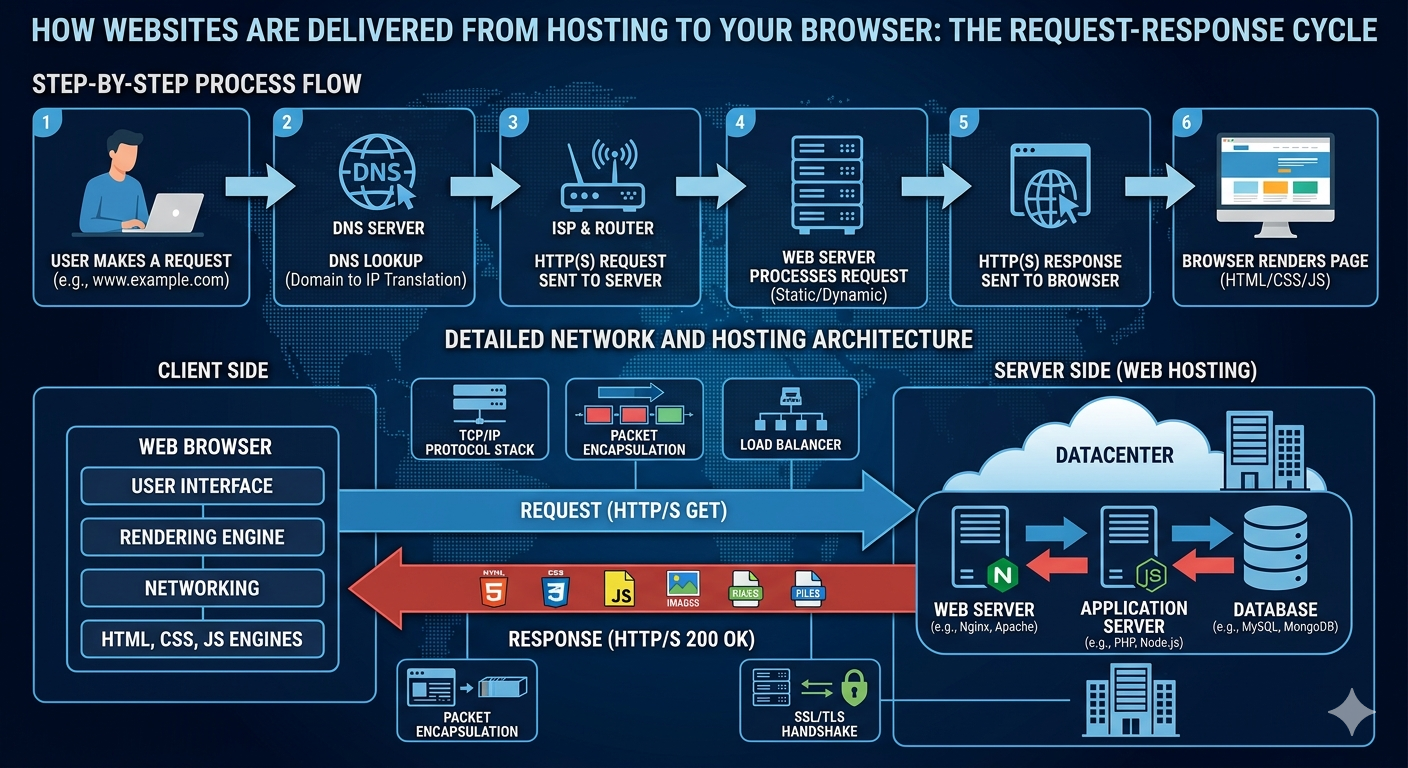
1. You Enter a Domain Name
Everything starts when you type a domain name (like yourwebsite.com) into your browser’s address bar.
A domain name is designed to be human-friendly. However, computers don’t understand domain names—they communicate using IP addresses (a series of numbers like 192.168.x.x).
So before anything else can happen, your browser needs to find the correct IP address linked to that domain.
2. DNS Translates Domain to IP Address
This is where the Domain Name System (DNS) comes in.
DNS works like a translator or a phonebook for the internet. It takes the domain name you entered and finds the corresponding IP address of the server where the website is hosted.
This process is called a DNS lookup. It usually happens very quickly, but if DNS records are not properly configured, your website may not be accessible—even if the server is working fine.
3. Browser Sends a Request to the Server
Once the IP address is found, your browser knows exactly where to go.
It sends a request to the web server using HTTP or HTTPS. This request basically says:
“Hey, I want to access this website—please send me the data.”
If the website uses HTTPS (which most modern sites do), the connection is secured using encryption to protect data between the user and the server.
4. The Web Server Processes the Request
After receiving the request, the server begins processing it.
For static websites, the server simply retrieves ready-made files like HTML, CSS, and JavaScript.
For dynamic websites (like WordPress or eCommerce sites), the server may also:
- Run scripts (e.g., PHP)
- Query a database
- Generate content dynamically based on user actions
This step can slightly affect loading speed depending on how optimized the server and website are.
5. Server Sends Data Back to Your Browser
Once everything is ready, the server sends the requested data back to your browser.
This response includes all the files needed to display the website properly, such as:
- HTML (structure)
- CSS (design)
- JavaScript (functionality)
- Images and media files
The speed of this step depends on factors like server performance, hosting quality, and network latency.
6. Browser Renders the Website
Now your browser takes over again.
It reads the HTML to understand the structure of the page, applies CSS to style it, and executes JavaScript to make the page interactive.
This process is called rendering. During this stage, the browser may also send additional requests to load images, fonts, or external scripts.
7. Website Fully Loaded on Your Screen
Finally, everything comes together, and the website is displayed on your screen.
Even after the page appears, some elements (like images or animations) may continue loading in the background.
All these steps—from entering a domain name to seeing a fully loaded website—usually happen in just a few seconds.
Why This Process Matters
Understanding how websites are delivered helps you troubleshoot common issues such as:
- Website not loading
- Slow performance
- DNS errors
- Server downtime
It also helps you make better decisions when choosing hosting services or optimizing your website for speed and performance.
Conclusion
The process of delivering a website from hosting to your browser may seem simple on the surface, but it involves multiple steps working together seamlessly.
From DNS lookup to server processing and browser rendering, each stage plays a critical role in ensuring users can access websites quickly and securely.
By understanding these fundamentals, you’ll be better equipped to manage your website, fix issues, and improve overall user experience.
