
Introduction
When you upload website to hosting, it may look like a simple process—just drag and drop files or deploy your project. But behind the scenes, a lot of technical processes happen to make your website live and accessible on the internet.
Understanding what really happens when you upload website to hosting helps you troubleshoot issues, optimize performance, and manage your website more effectively. In this article, we’ll break it down into 7 clear steps.
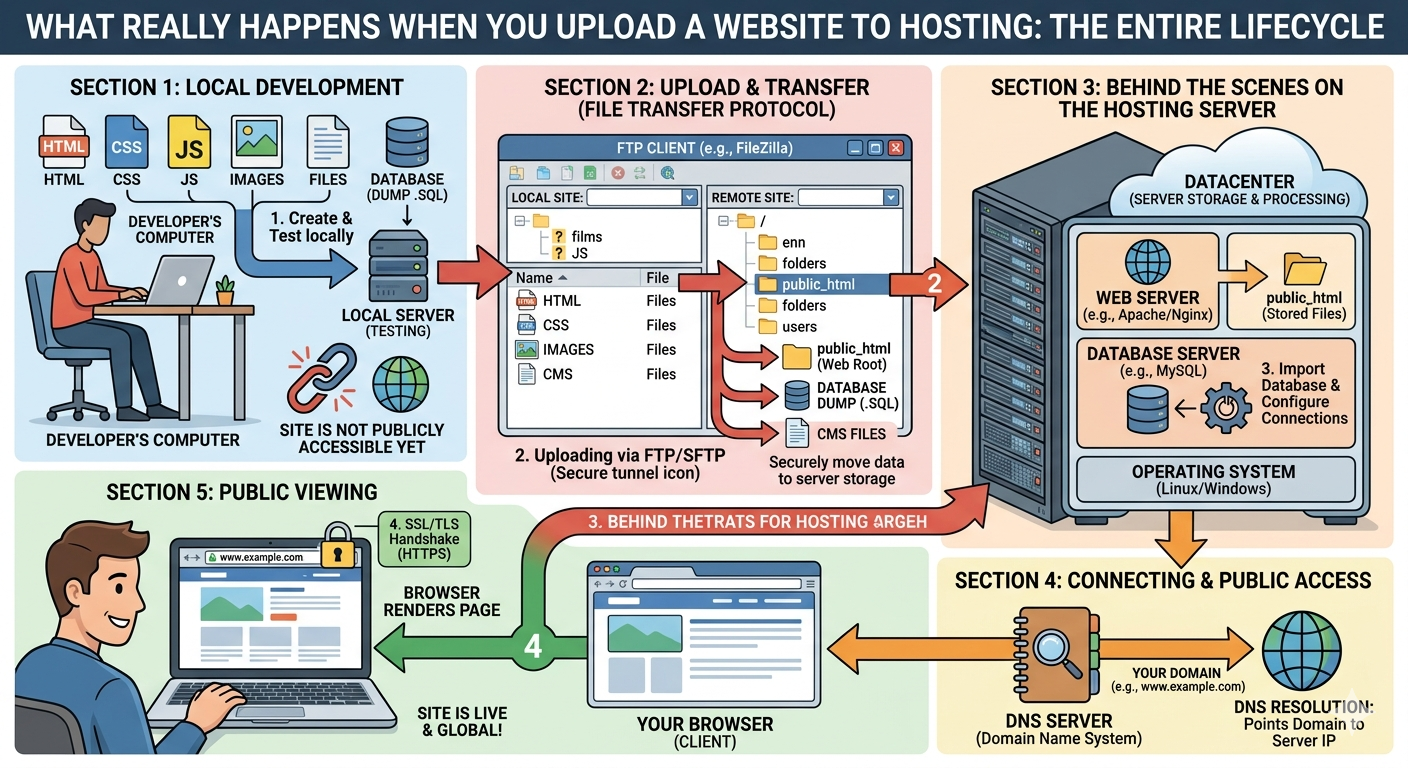
1. Files Are Transferred to the Server
The first thing that happens is file transfer.
When you upload your website, all your files (HTML, CSS, JavaScript, images, and backend files) are sent from your local device or Git repository to the hosting server.
This is usually done using:
- FTP (File Transfer Protocol)
- File Manager in hosting panel
- Git deployment tools
2. Server Stores Your Website Files
Once uploaded, the hosting server stores your website files in a specific directory (usually called public_html or www folder).
This folder becomes the main root of your website, meaning everything inside it will be publicly accessible through your domain.
3. Domain Gets Connected to Hosting
Next, your domain name is linked to your hosting server using DNS settings.
DNS tells the internet:
👉 “When someone visits this domain, send them to this server.”
Without proper DNS configuration, your website will not appear even if files are already uploaded.
4. Server Configuration Begins
After the files are in place, the server starts configuring how your website should run.
This may include:
- Setting up PHP or Node.js environment
- Loading server rules (.htaccess or Nginx config)
- Defining permissions for files and folders
This step ensures your website runs correctly based on its technology stack.
5. Database Connection Is Established (If Needed)
If your website uses a database (like WordPress or eCommerce sites), the system connects to it at this stage.
The database stores important information such as:
- User accounts
- Product data
- Blog posts
- Settings and configurations
Without this connection, dynamic websites will not function properly.
6. Website Becomes Accessible via Browser
Once everything is set up, your website becomes accessible through the internet.
When someone types your domain:
- DNS finds your server
- Server responds with your website files
- Browser renders the website
This entire process happens in just a few seconds.
7. Background Systems Start Working
Even after your website is live, background systems continue working.
These include:
- Security monitoring
- Backup systems
- Performance caching
- SSL encryption (HTTPS security)
These systems ensure your website stays stable, fast, and secure.
8. File Permissions and Security Rules Are Applied
After your website is uploaded, the hosting server will also apply file permissions and security rules.
This step is very important because it controls:
- who can access certain files
- what files can be executed
- what data should remain private
For example:
- public files (like images and HTML) are set to be accessible
- sensitive files (like configuration files) are restricted
If permissions are set incorrectly, your website may show errors or even become vulnerable to attacks.
9. Caching and Optimization Systems Kick In
Modern hosting systems often use caching to improve website speed.
Once your website is live, caching systems may:
- store static versions of your pages
- reduce server load
- speed up page loading for visitors
Some hosting providers also use CDN (Content Delivery Network), which distributes your website content across different locations worldwide. This helps users access your site faster no matter where they are.
10. Continuous Monitoring Begins
Even after your website is successfully uploaded and live, hosting systems don’t stop working.
They continue to monitor:
- uptime (whether your site is online)
- performance (speed and response time)
- errors (server or application issues)
If something goes wrong, alerts are sent immediately so the issue can be fixed quickly before it affects too many users.
Why Understanding This Process Matters
Knowing what really happens when you upload a website to hosting helps you:
- Fix deployment issues faster
- Understand hosting errors
- Improve website performance
- Choose better hosting providers
It also gives you a clearer picture of how the internet works behind the scenes.
Conclusion
Uploading a website is more than just transferring files. It involves server configuration, DNS connection, database setup, and background systems working together to make your website live.
By understanding what really happens when you upload website to hosting, you’ll have better control over your projects and be able to manage websites more efficiently.
