
Introduction
How APIs communicate with servers is a core process in modern web development that allows applications, mobile apps, and backend systems to exchange data efficiently. Every time you open an app like Instagram, Shopee, or use online banking, APIs are working silently in the background to handle communication between client and server.
Without APIs, modern digital systems would be slow, disconnected, and extremely difficult to scale.
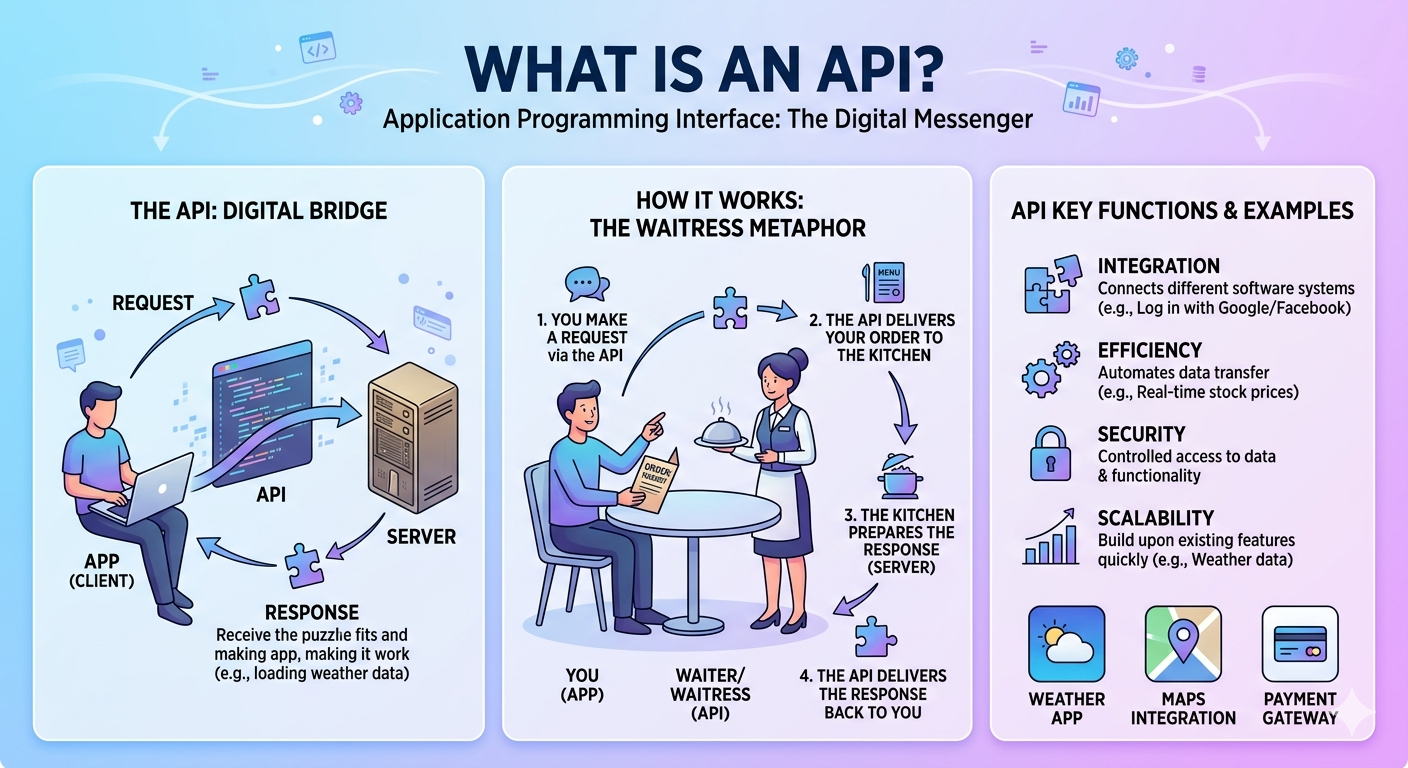
What is an API?
API stands for Application Programming Interface.
An API is a communication layer that allows different software systems to interact without needing direct access to each other’s internal structure.
Simple analogy:
- User/app → customer
- API → waiter
- Server → kitchen
- Database → storage room
The customer does not enter the kitchen; the waiter handles everything in between.
How APIs Communicate With Servers (Request Phase)
When discussing how APIs communicate with servers, everything begins with a request.
A client (mobile app, browser, or system) sends a request that includes:
- What data is needed
- What operation to perform
- Authentication (API key, token, session ID)
Common HTTP methods:
- GET → retrieve data
- POST → send data
- PUT → update data
- DELETE → remove data
Example:
GET /user/profile?id=123
At this stage, the API acts as the entry point for all communication.
API Gateway (Traffic Control Layer)
In modern architectures, requests often go through an API Gateway before reaching the server.
The API gateway is responsible for:
- Authentication & authorization
- Rate limiting (prevent abuse)
- Request routing to correct microservice
- Logging & monitoring
This layer is extremely important in cloud systems like AWS or microservices-based applications because it improves security and scalability.
Server Processing (Backend Logic)
Once the request reaches the backend server, it starts processing.
The server may:
- Validate incoming data
- Execute business logic
- Call internal services
- Perform calculations
Example:
If a request asks for user data:
- Server checks user ID
- Validates access permission
- Retrieves data from database
This step is the core of how APIs communicate with servers.
Database Interaction
Most API systems depend heavily on databases.
The server interacts with database using queries such as:
- SELECT → fetch data
- INSERT → add new data
- UPDATE → modify data
- DELETE → remove data
If database queries are not optimized, API performance will slow down significantly—even if the server hardware is powerful.
Caching Layer (Performance Boost)
In high-performance systems, caching is used to reduce server load.
Instead of always querying the database, the system may store frequently accessed data in:
- Redis
- Memory cache
- CDN cache
This improves speed and reduces latency.
Example:
If 10,000 users request the same product data, caching prevents 10,000 database calls.
Server Sends Response
After processing, the server sends a response back through the API.
Most APIs use JSON format because it is lightweight and easy to parse.
Example:
{
  "user_id": 123,
  "name": "Ali",
  "status": "active",
  "plan": "premium"
}
This response travels back through the API gateway and reaches the client.
Client Receives and Displays Data
Finally, the application receives the response and displays it to the user.
Examples:
- Social media feed loads posts
- E-commerce app shows products
- Dashboard updates analytics
This entire cycle usually happens in milliseconds depending on system performance.
Latency (Why Some APIs Are Slow)
Even when everything is correct, API speed depends on latency.
Latency is affected by:
- Distance between user and server
- Server processing speed
- Database performance
- Network congestion
This is why cloud providers use multiple data centers worldwide.
Types of APIs
🔹 REST API
- Most widely used
- Uses HTTP methods
- Stateless and scalable
🔹 SOAP API
- Older enterprise system
- Uses XML format
- Highly structured and secure
🔹 GraphQL
- Client controls data request
- Reduces over-fetching
- Efficient for complex systems
Why APIs Are Important
APIs are the backbone of modern software because they:
- Connect frontend and backend systems
- Enable mobile and web app integration
- Support third-party services (payments, maps, login systems)
- Allow microservices architecture
- Improve scalability and modular design
Without APIs, modern applications would not be able to function.
Real-World Example (E-Commerce Flow)
When you use an online store:
- Search product
- App sends API request
- API gateway routes request
- Server queries database
- Cache checks for stored results
- API returns response
- App displays products
This entire process happens in less than a second.
External Resource
Learn more:
https://developer.mozilla.org/en-US/docs/Learn/JavaScript/Client-side_web_APIs/Introduction
Internal Link Suggestion
Link to:
Why Websites Slow Down Even With Good Hosting
Conclusion
Understanding how APIs communicate with servers gives a strong foundation in modern web development. APIs handle everything from simple data requests to complex system communication, making them essential in today’s digital infrastructure.
They are the invisible bridge that keeps apps fast, connected, and scalable.
