
VPS server security is one of the most important aspects of managing a virtual private server. As more businesses and developers rely on VPS hosting for websites, applications, and online services, cyber threats continue to increase. Without proper protection, a VPS server can become vulnerable to hacking attempts, malware infections, data theft, and unauthorized access.
A secure VPS not only protects sensitive information but also improves website stability, customer trust, and overall server performance. Whether you are managing a business website, hosting applications, or running an eCommerce platform, implementing strong security measures is essential for long-term success.
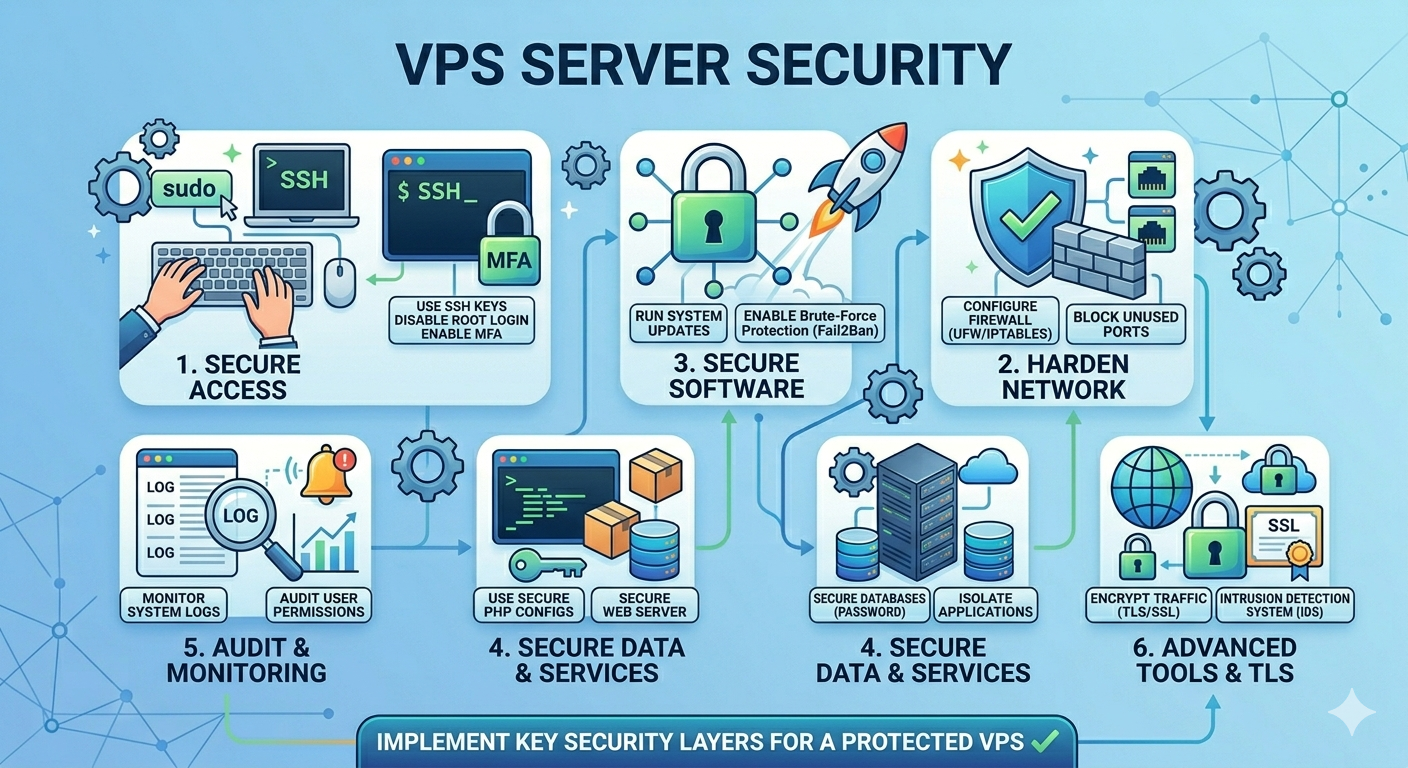
Why VPS Server Security Is Important
Many users believe VPS hosting is automatically secure because it offers isolated resources compared to shared hosting. While VPS hosting provides better control and privacy, security still depends heavily on server configuration and maintenance.
Hackers often target poorly configured servers using brute-force attacks, outdated software vulnerabilities, and weak passwords. A single security breach can lead to downtime, financial losses, and damaged reputation.
Improving VPS server security helps prevent unauthorized access, protects customer data, and ensures business continuity. Strong security practices also reduce the chances of malware spreading through the server.
Use Strong Passwords and SSH Keys
One of the easiest ways to improve VPS server security is by using strong passwords. Weak passwords are one of the main reasons servers get compromised.
A strong password should include:
- Uppercase and lowercase letters
- Numbers
- Special characters
- At least 12 characters in length
Avoid using common words, birthdays, or simple number combinations.
In addition to strong passwords, server administrators should use SSH keys instead of password-based logins whenever possible. SSH authentication is far more secure because it uses encrypted key pairs for access verification.
Disabling password login after setting up SSH keys can significantly reduce brute-force attack risks.
Change the Default SSH Port
By default, most Linux VPS servers use port 22 for SSH connections. Hackers frequently scan this port looking for vulnerable servers.
Changing the default SSH port to a custom port helps reduce automated attack attempts. Although this is not a complete security solution, it adds an additional layer of protection against bots and unauthorized login attempts.
After changing the SSH port, administrators should update firewall settings to allow the new port.
Keep the Server Updated
Regular updates are critical for VPS server security. Operating systems, control panels, and software packages frequently release security patches to fix vulnerabilities.
Outdated software is one of the most common entry points for attackers. Businesses should regularly update:
- Operating systems
- Web servers
- CMS platforms
- Plugins and extensions
- Database software
Enabling automatic security updates can help reduce risks and improve server protection.
Configure a Firewall
A firewall acts as a security barrier between the VPS server and external traffic. Proper firewall configuration helps block suspicious connections and unauthorized access attempts.
Popular firewall tools for VPS hosting include:
- UFW (Uncomplicated Firewall)
- CSF (ConfigServer Security & Firewall)
- iptables
A firewall should only allow necessary ports and services while blocking unused connections. Restricting unnecessary access significantly improves overall security.
Install Anti-Malware and Security Tools
Anti-malware software helps detect and remove malicious files before they cause damage. VPS administrators should regularly scan servers for malware, spyware, and suspicious activity.
Popular server security tools include:
- ClamAV
- Fail2Ban
- Maldet (Linux Malware Detect)
Fail2Ban is especially useful because it automatically blocks IP addresses after repeated failed login attempts. This helps prevent brute-force attacks against SSH and other services.
Disable Unused Services
Unused services and applications can create security vulnerabilities. Every active service increases the server’s attack surface.
Administrators should regularly review installed applications and disable anything unnecessary. Removing unused software reduces potential entry points for attackers and improves server performance.
Minimal server setups are generally safer and easier to maintain.
Enable Regular Backups
Backups are an essential part of VPS server security. Even with strong protection, security incidents can still happen. Having recent backups ensures businesses can quickly restore data after attacks, accidental deletion, or hardware failures.
Businesses should create:
- Daily backups
- Weekly backups
- Offsite backups
Storing backups in a separate location improves disaster recovery and minimizes downtime.
Use SSL Certificates
SSL certificates encrypt communication between websites and visitors. Encryption protects sensitive information such as login credentials, payment details, and customer data.
Websites without SSL are more vulnerable to interception attacks and may appear unsafe to users. Search engines also favor secure HTTPS websites, which can improve SEO rankings.
Installing SSL certificates is now considered a basic security requirement for modern websites.
Monitor Server Activity
Continuous monitoring helps identify suspicious activity before it becomes a serious problem. VPS administrators should regularly review:
- Login attempts
- Resource usage
- Error logs
- Network traffic
Monitoring tools can alert administrators when unusual activity occurs, allowing faster responses to potential threats.
Server monitoring also improves performance optimization and uptime management.
Limit User Access
Not every user should have full administrative privileges. Limiting user permissions reduces the risk of accidental changes or unauthorized access.
Businesses should create separate accounts for different users and only provide the minimum permissions required for their tasks. This security principle is known as “least privilege access.”
Restricting root access is another effective way to improve VPS server security.
Conclusion
VPS server security is essential for protecting websites, applications, and business data from modern cyber threats. As hacking methods continue to evolve, businesses must take proactive steps to secure their servers.
Using strong passwords, enabling firewalls, installing security tools, updating software, and monitoring server activity are among the best ways to improve VPS server security in 2026.
A properly secured VPS not only protects sensitive information but also improves reliability, performance, and customer trust. By following strong security practices, businesses can reduce risks and maintain a safer online environment for long-term success.
