
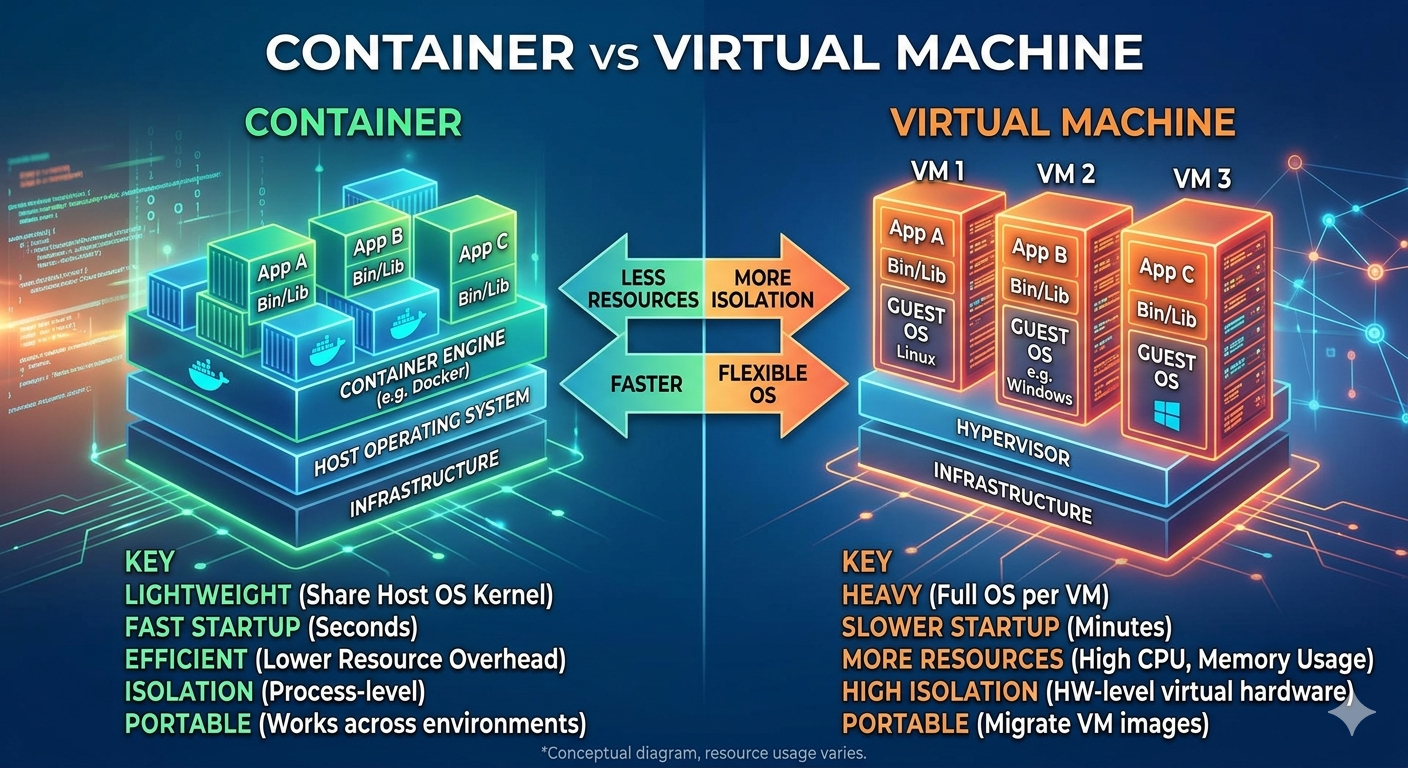
When discussing modern hosting infrastructure, two technologies often come up: container vs virtual machines (VMs). At first glance, they may seem similar because both allow multiple isolated environments to run on a single physical server. However, the way they operate is fundamentally different, and this impacts performance, scalability, and real-world use cases.
Understanding the difference between containers and virtual machines is important for developers, system administrators, and businesses choosing the right infrastructure.
🧱 What is a Virtual Machine?
A virtual machine (VM) is a fully virtualized computer that runs on top of a physical server using a hypervisor such as KVM, VMware, or Hyper-V.
Each VM includes:
- A full operating system (Linux or Windows)
- Virtual CPU, RAM, and storage
- Complete isolation from other virtual machines
Because each VM runs its own OS, it behaves like an independent server.
This makes VMs ideal for environments where strong isolation and full system control are required.
👉 In simple terms, a VM is like running multiple separate computers inside one physical machine.
📦 What is a Container?
A container is a lightweight, portable environment that runs applications using the host system’s operating system kernel.
Instead of virtualizing hardware, containers package:
- Application code
- Runtime
- Dependencies and libraries
Containers share the same OS kernel, making them much more efficient and faster compared to VMs.
Tools like Docker and Kubernetes are commonly used to manage containers at scale.
👉 Think of containers as isolated applications running on the same operating system.
⚡ Key Differences Between Containers and VMs
1. Performance
Virtual machines are heavier because they run a full operating system. This increases boot time and resource consumption.
Containers are lightweight and start almost instantly, making them ideal for fast deployment environments.
2. Resource Usage
VMs require more CPU, RAM, and storage because each instance runs a complete OS.
Containers share the host OS, making them significantly more efficient in resource usage.
3. Isolation Level
VMs provide strong isolation since each VM is completely separate.
Containers offer process-level isolation but still share the same kernel, which makes them slightly less isolated but more efficient.
4. Scalability
VMs take longer to provision and scale because of their size.
Containers can be deployed and scaled quickly, making them suitable for microservices and cloud-native applications.
5. Use Cases
Virtual machines are commonly used for:
- Legacy applications
- Running multiple operating systems
- Secure isolated environments
Containers are used for:
- Modern web applications
- Microservices architecture
- Continuous integration and deployment (CI/CD)
🧠 Why This Difference Matters in Real Hosting
In real-world hosting environments, the choice between containers and virtual machines can significantly impact cost, performance, and scalability.
For example, if you are running a small application or microservice-based system, containers allow you to deploy updates faster and use fewer resources. This leads to better efficiency, especially in cloud-native environments.
On the other hand, if you are hosting applications that require strict isolation or run different operating systems, virtual machines are still the better choice.
🏗️ Infrastructure Perspective
From an infrastructure point of view, virtual machines are closer to traditional server hosting. They give you full control over the environment, including kernel-level configurations.
However, this also means more overhead. Each VM consumes a significant amount of system resources, which can limit how many instances you can run on a single physical server.
Containers solve this problem by sharing the host operating system. This allows providers to run hundreds or even thousands of containers on a single server efficiently.
🔄 Deployment and Maintenance
Deployment speed is another major difference.
With virtual machines, creating a new instance involves booting a full operating system, which takes time and resources.
With containers, deployment is almost instant. This makes containers ideal for continuous deployment pipelines and modern DevOps workflows.
Maintenance is also simpler with containers because updates can be rolled out by replacing images rather than patching full operating systems.
📊 Real-World Usage
In production environments today, both technologies are widely used together.
For example:
- Containers are used to run application services
- Virtual machines are used to host databases or legacy systems
This hybrid approach allows companies to balance performance, security, and flexibility.
