
Introduction
How data travels from your device to a server and back again is one of the most important concepts in understanding how the internet works. Every action you take online—opening a website, sending a message, or streaming a video—relies on a structured communication system between your device and remote servers.
Although the process feels instant, it involves multiple systems working together across networks, routers, and data centers around the world.
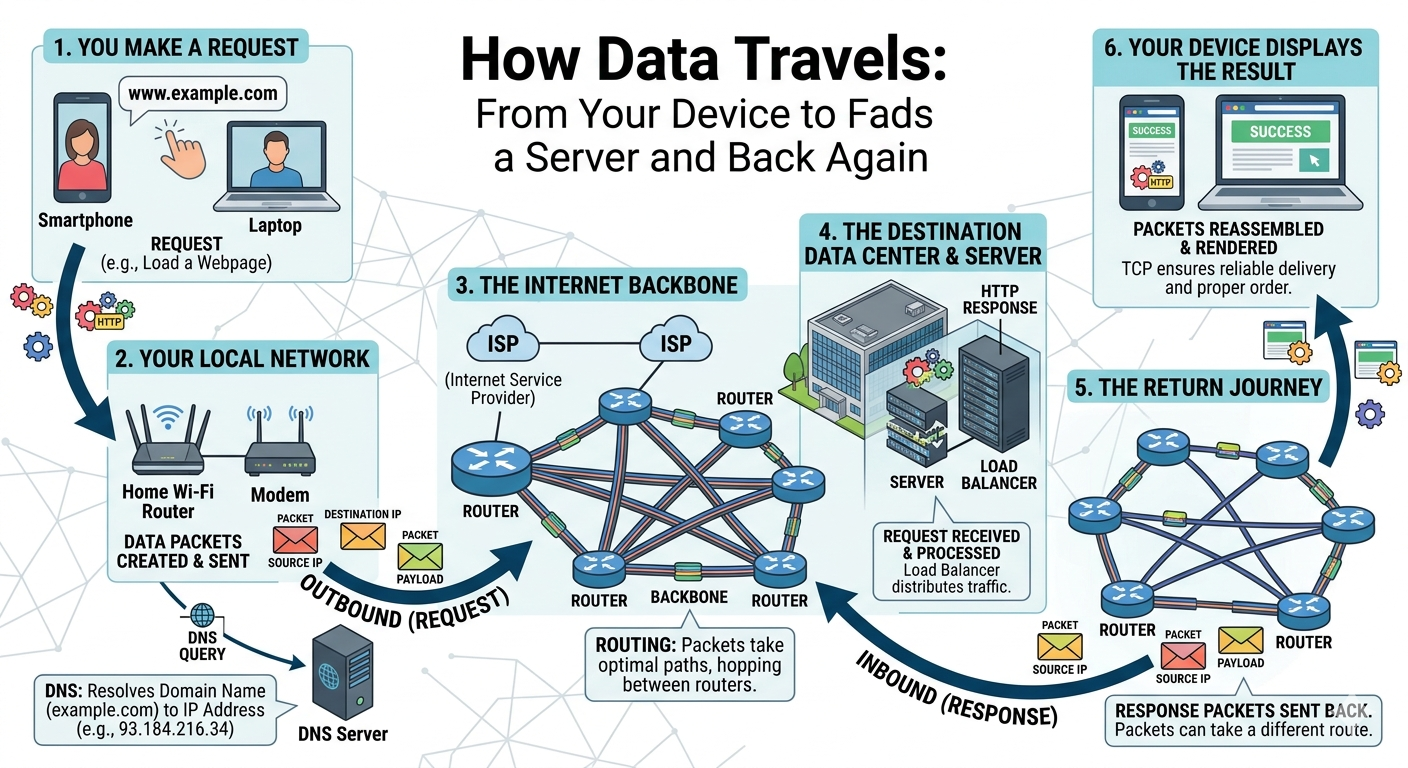
1. It Starts With a User Action
The journey begins when you interact with an application:
- Typing a URL in a browser
- Clicking a button in an app
- Sending a request to an API
Your device then prepares a data packet, which includes:
- Destination address
- Request type (GET, POST, etc.)
- Metadata (headers, cookies, authentication tokens)
This packet is the foundation of all internet communication.
2. Device Sends Data to Router
Before reaching the internet, your device sends data to your local router.
The router:
- Converts data into network signals
- Assigns local routing paths
- Prepares packet for ISP transmission
This step is often overlooked but is the first hop in the entire network journey.
3. Internet Service Provider (ISP) Takes Over
Your ISP is the bridge between your home network and the global internet.
It:
- Routes traffic to backbone networks
- Chooses optimal paths
- Manages bandwidth allocation
- Handles congestion control
Examples include:
- Unifi
- Maxis
- Time Broadband
Without ISP routing, global connectivity would not be possible.
4. DNS Resolution (Finding the Server)
Before reaching the actual server, your device must find its IP address using DNS (Domain Name System).
Example:
- You type:
example.com - DNS resolves it into an IP like
93.184.x.x
DNS acts like the phonebook of the internet, translating human-readable domains into machine-readable addresses.
Without DNS, users would need to memorize IP addresses instead of website names.
5. Data Travels Through the Internet Backbone
Once the destination IP is known, data enters the global internet infrastructure.
It passes through:
- Multiple routers
- Network nodes
- Undersea fiber optic cables
- Tier-1 backbone providers
At this stage, routing efficiency plays a big role in performance.
Factors affecting speed:
- Distance between user and server
- Number of hops (routers)
- Network congestion
- Peering agreements between ISPs
This is where latency is introduced.
6. Server Receives and Processes Request
When data reaches the server, the backend system begins processing:
Typical steps include:
- Parsing the request
- Authenticating user/session
- Running backend logic
- Querying databases
- Generating response
Depending on system design, this may involve:
- Monolithic architecture
- Microservices
- API gateways
- Load balancers
A slow backend = slow response, regardless of internet speed.
7. Database Interaction (Critical Bottleneck)
Most dynamic websites rely heavily on databases.
The server may:
- Fetch records (SELECT)
- Insert new data (INSERT)
- Update existing data (UPDATE)
- Delete entries (DELETE)
Poor database design can significantly slow down response time even if server hardware is strong.
Common issues:
- Missing indexes
- Large unoptimized queries
- Excessive joins
- No caching layer
8. Server Sends Response Back
After processing, the server sends data back to your device.
This response:
- Is split into packets
- Routed back through internet backbone
- Passes ISP network
- Reaches your router
- Delivered to your device
Most modern APIs use JSON format because it is lightweight and fast to parse.
Example:
{
  "status": "success",
  "data": "Hello World",
  "timestamp": "2026-04-29"
}
9. Browser or App Renders the Data
Finally, your device:
- Reassembles packets
- Processes response
- Renders UI content
This is what creates the illusion of instant loading.
⚡ Why Some Websites Feel Faster Than Others
Even with identical hosting, performance differences come from:
🔹 1. Server Optimization
- Efficient code
- Fast backend logic
- Proper architecture
🔹 2. Caching Systems
- Browser cache
- CDN cache
- Server-side cache
🔹 3. Database Efficiency
- Proper indexing
- Optimized queries
🔹 4. Network Latency
- Distance to server
- Routing efficiency
🔹 5. Frontend Optimization
- Image compression
- Minified JS/CSS
- Lazy loading
🌍 Real-World Example: Opening a Website
When you open YouTube or Google:
- Device sends request
- DNS resolves domain
- Request travels through ISP
- Reaches Google server
- Server processes request
- Database fetches data
- Response is sent back
- Page loads instantly
All of this happens in milliseconds due to global optimization.
📊 Conclusion
Understanding how data travels from your device to a server and back again gives you a clear picture of how the internet actually works. It is not magic or instant—it is a highly optimized system involving DNS, routing, servers, and databases working together seamlessly.
