
Introduction
Website speed is one of the most important factors in modern web performance. Users expect pages to load instantly, and search engines reward fast websites with better rankings.
One of the key technologies that makes this possible is caching in web hosting. It improves performance by reducing server workload and delivering content faster to users.
In this article, we will explore why caching is considered the most powerful feature in web hosting and how it significantly impacts website performance.
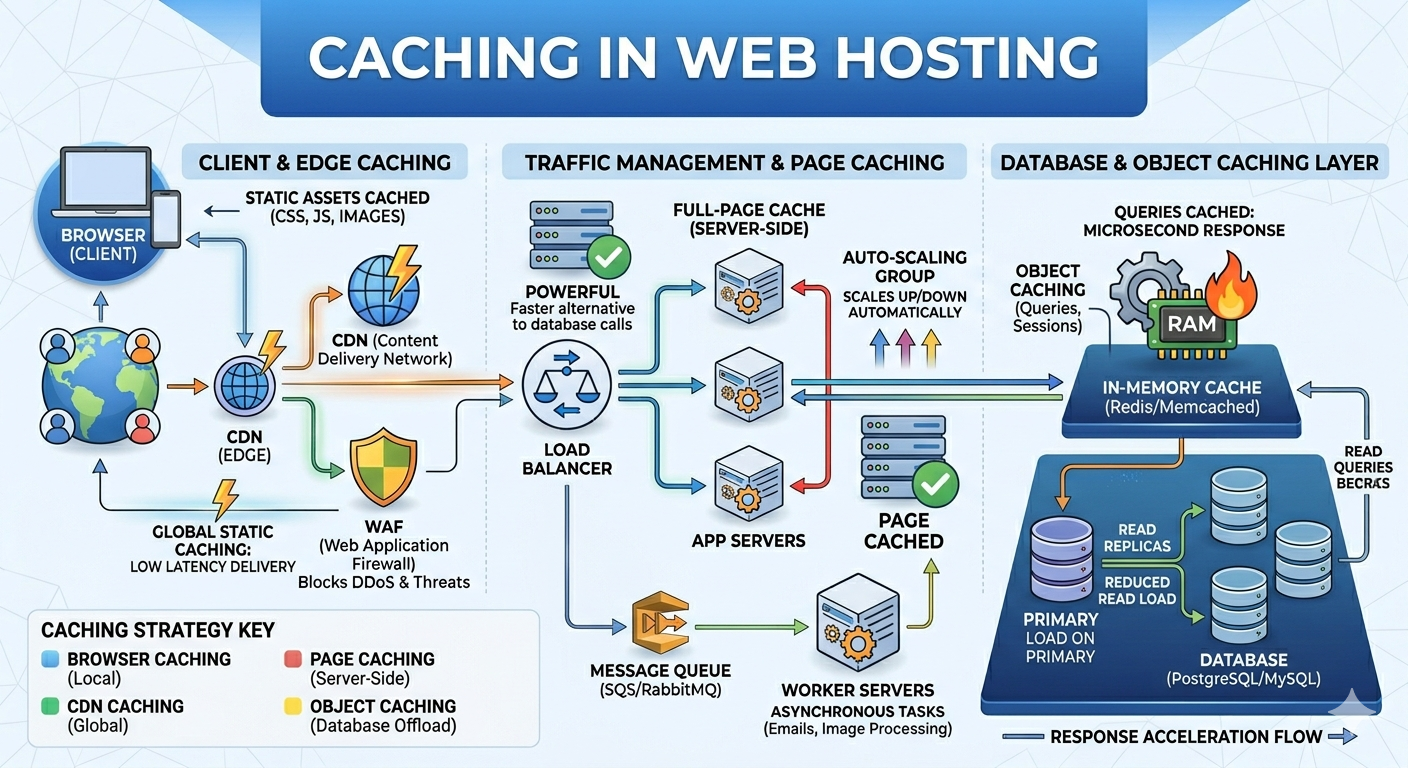
1. Dramatically Improves Website Speed
Caching works by storing copies of website data so it can be reused without repeatedly generating it from scratch.
Instead of processing database queries every time a user visits a page, cached content is delivered instantly.
This results in:
- Faster page load times
- Reduced server processing time
- Improved overall performance
Speed is a critical ranking factor, and caching directly helps improve it.
2. Reduces Server Load
Without caching, every user request forces the server to execute scripts, query databases, and rebuild pages.
With caching:
- Repeated requests are served instantly
- Database load is reduced
- CPU usage is minimized
This allows servers to handle more traffic efficiently without slowing down.
3. Improves Website Scalability
As traffic increases, websites without caching often struggle to maintain performance.
Caching helps scalability by:
- Handling high traffic more efficiently
- Reducing backend processing load
- Preventing server overload during spikes
This makes it essential for growing websites and online businesses.
4. Enhances User Experience
A fast website leads to a better user experience.
Caching improves UX by:
- Reducing page load delays
- Making navigation smoother
- Ensuring consistent performance
Users are more likely to stay on a website that responds quickly, reducing bounce rates and increasing engagement.
5. Reduces Hosting Costs
Efficient caching reduces the need for high server resources.
This results in:
- Lower CPU usage
- Reduced memory consumption
- Less need for expensive server upgrades
Over time, caching can significantly reduce infrastructure and hosting costs.
6. Works Across Multiple Layers
Caching is not limited to one system—it operates at multiple levels:
- Browser caching
- Server-side caching
- Database caching
- CDN caching
Each layer contributes to faster content delivery and improved system efficiency.
7. Boosts SEO Performance
Search engines prioritize fast-loading websites.
By improving speed, caching indirectly helps:
- Improve search rankings
- Enhance Core Web Vitals scores
- Improve crawl efficiency
This makes caching an important factor in SEO optimization.
8. Improves Stability During High Traffic
During traffic spikes, uncached systems often become slow or crash.
Caching helps by:
- Serving preloaded content instantly
- Reducing backend stress
- Preventing downtime
This ensures your website remains stable even under heavy load.
9. Types of Caching in Web Hosting
Different types of caching work together to improve performance:
Browser Caching
Stores static files like images, CSS, and JavaScript in the user’s browser.
Server-Side Caching
Stores processed data on the server for faster response times.
Database Caching
Reduces repeated database queries by storing results temporarily.
CDN Caching
Distributes cached content across global servers for faster delivery.
Each type plays an important role in optimizing performance.
10. Caching with CDN for Maximum Performance
Caching becomes even more powerful when combined with a Content Delivery Network (CDN).
A CDN stores cached versions of your website across multiple global locations.
Benefits include:
- Faster global access
- Reduced latency
- Lower server load
This combination is widely used in high-performance web infrastructure.
11. Common Mistakes with Caching
Even though caching is powerful, incorrect setup can cause problems.
Common mistakes include:
- Not clearing cache after updates
- Over-caching dynamic content
- Misconfigured cache rules
- Using conflicting caching systems
These issues can lead to outdated or broken content.
12. When Not to Use Aggressive Caching
Not all content should be cached.
Avoid caching for:
- User dashboards
- Real-time data systems
- Checkout or payment pages
Caching dynamic content incorrectly can break functionality.
Conclusion
Caching in web hosting is one of the most powerful features for improving website performance. It enhances speed, reduces server load, improves scalability, and supports better SEO rankings.
When properly configured, caching ensures that websites load faster, handle traffic more efficiently, and deliver a smoother user experience.
