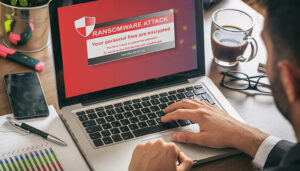
Ransomware Threats are a type of cyberattack that spread across the internet and encrypt computer files, holding them hostage until a ransom is paid. According to Malwarebytes, these assaults can target anyone, and the encrypted data is often inaccessible without paying the hackers.
As hackers became more prevalent, many information technology companies began developing advanced cybersecurity measures for public use. While ransomware attacks can be dangerous, they can also be prevented with proper precautions. Today, here at ServerGigabit, we will shed light on the background of ransomware and explore ways to protect your data.
Origin of Ransomware Threats
Since 1989, criminal hackers have used the tactic of keeping encrypted information hostage in return for money. The AIDS trojan, which was distributed via floppy disc in 1989, was one of the first ransomware assaults ever reported (PC Cyborg Virus). Even though it was just a basic virus using symmetric cryptography, the attacker wanted $189 to expose the encrypted data.
About Ransomware Threats
Ransomware is a sort of virus that prohibits users from accessing their computer or personal files and demands money in exchange for access. While some users may believe that a virus has locked their computer, ransomware is a distinct type of software than a virus. Payment for the first ransomware variations in the 1980s was required to be remitted by snail mail. Today, a wider range of people are encouraged to use cryptocurrencies to make payments.
Ways Ransomware Could Attack
1) Malspam
Malicious spam, often known as malspam, is unsolicited email that contains malware. Attachments such as PDFs or Word documents might be booby-trapped in the email. It’s also possible that it contains connections to harmful websites.
Do not open any attachments that you are unfamiliar with. Take extreme precautions to avoid being infected with ransomware. Make sure your security software is up to date, download malware protection, and remove suspicious attachments before opening links or downloading anything you didn’t anticipate.
2) Malvertising
Malvertising, often known as harmful advertising, is the practise of using web advertisements to spread malware. Phishing schemes are one technique for hackers to impersonate genuine businesses and deceive consumers into handing up their passwords and other personal information.
3) Spear Phishing
Spear phishing is a sort of hacking that targets individual users, generally the company’s highest-ranking decision-makers. Emails regarding key talks with your CEO, for example, or important files from emails that need to be downloaded.
4) Social Manipulation
Social manipulation is used by cybercriminals in various sorts of ransomware attacks, such as imitating the FBI. This just serves to scare people into paying cyber criminals to recover access to their files.
If a ‘threat actor’ acquires information about your hobbies, frequent destinations, and kind of employment from your public social media accounts, this is an example of social engineering. Then they send you a message that seems like it came from someone you know in the hopes that you would click on it before realising it is not genuine.
Tips for Ransomware Prevention
Protecting your devices from ransomware threats starts with using reliable and regularly updated antivirus software. Frequent backups of important data to secure locations, such as external drives or cloud storage, are essential. This ensures that even if ransomware encrypts your files, you can restore them without paying a ransom. Additionally, be cautious with emails, links, and attachments from unknown sources, as these are common ways ransomware spreads.
Enabling multi-factor authentication (MFA) on all accounts adds another layer of security by requiring more than one form of verification before granting access. Combine MFA with strong, unique passwords and regular password updates. Educating yourself and your team about phishing, malvertising, and social engineering attacks further reduces the risk of infection. By following these measures, you can significantly safeguard your devices and data against ransomware threats.
Beware and Learn to Handle Ransomware Attacks
Here are some of the first symptoms that you’re being targeted by ransomware: Images on the desktop are distorted, data are encrypted, and the machine is locked. By frequently backing up your hard drive and updating your passwords, you may avoid dealing with ransomware.
Avoid Ransomware Attacks
An antivirus tool actively protects data by scanning the entire system for viruses, worms, and other dangerous programmes. Installing an antivirus application is a simple yet effective technique to protect yourself against hacking. The strongest weapon against ransomware assaults is to stay up to date and use sophisticated scanning.
Ransomware is a problem that affects more than just businesses. In recent years, data security has become one of the most essential challenges for the majority of businesses throughout the world. As a result, data must be backed up in many locations, as a ransomware assault might wipe it out. It’s also a good idea to run an anti-virus application on a regular basis and pay attention to malware alerts.
It may appear that taking extra precautions to protect your data is time-consuming and inconvenient, but as the phrase goes, it’s better to be safe than sorry.
Consider signing up for a Virtual Private Network (VPN), which provides an anonymous tunnel across the internet to assist against dangerous hacker assaults. Each VPN connection is completely private, allowing you to keep your actions secret and protected from prying eyes.